Pages

Showing posts with label and. Show all posts

Sunday, April 6, 2014

Download Application Stopwatch Free for Nokia 5800 and N8

Stopwatch Free is a nice application from Appsolute Solutions for Symbian^3 and Symbian S60v5 based touchscreen smartphones from Nokia. To measure time just click on the "Start" button. If you want to take laptimes, just click on the "Lap" button.


You can reset the whole app by clicking the "Reset" button or just clear the laps with the "Clear Laps" button. This version of Stopwatch includes ads and you can take only 5 laptimes. The interface is nice and application works perfectly.


Stopwatch Free application works with Nokia 5800 XpressMusic, N97, N97 Mini, X6, 5228, 5230, 5233, 5235, 5530 XpressMusic, N8, E7, C6 and C7. The version 1.0 of this application can be downloaded from the following link.

Application Stopwatch Free for Nokia 5800 XpressMusic and N97 (105 KB)
Related Posts:
Read More..

Thursday, April 3, 2014

Download Theme Strawberry by MMMOOO for Nokia 5800 and X6

Strawberry by MMMOOO is sweet theme for Symbian S60 5th edition based smartphones from Nokia. Its a cute theme with lovely graphics on homescreen. The strawberry clock on homescreen looks amazing. The light pink color used in this theme looks good too.


Very unique shaped custom icons used in this theme looks little light in color. The theme is fully transparent and works just great. The theme works with Nokia 5800 XpressMusic, N97, N97 Mini, X6, 5228, 5230, 5233, 5235 and 5530 XpressMusic. Download the Strawberry theme by MMMOOO from the following link.

Theme Strawberry by MMMOOO for Nokia 5800 XpressMusic and N97 (2.0 MB)
Related Posts:
Read More..

Monday, March 31, 2014

Nokia Store Not to Allow New Symbian and Meego App from 1st Jan 2014

Time has finally come for Symbian. Nokia has recently sent a mail to all app developers about new development on Symbian and Meego. In the mail, its written that after 1st Jan, 2014, Nokia Store will not allow any new Symbian and/or Meego application or updates to existing application.

Nokia Symbian

Users will still be able to download the applications but no new application will see the Nokia Store after 1st Jan, 2014. You may see some development from publishers and they may provide direct links of apps from their websites. Nokia has finally put a brake on Symbian. This is very disappointing news for millions of Symbian users. Heres the email-
Dear Nokia Developer,

With the growing business opportunities available on the Asha and Windows Phone platforms, we have been reviewing our developer content programs to see how we can maximize our support to you, our developers. As a result of this review, we have decided to focus our support and investment in new content toward Asha and Windows Phone. Over the next few months we will be transitioning our active developer support away from Symbian and MeeGo.

If you have Symbian and MeeGo content in the Nokia Store, it will continue to be available for download to customers, and you will continue to receive download and revenue reports as well as payouts for downloaded content. However, starting January 1, 2014, you will no longer be able to publish any new content or update existing content for Symbian and MeeGo.

We are very excited about the opportunities available with Asha and Windows Phone, and hope that you will bring your talents to these platforms. We believe that these changes will help improve our ability to support you as you develop fantastic apps for your customers.

It is clear from mail that Nokia is now focusing on Asha and Windows Phone platform. Symbian and Meego is of least to no importance.


Source: allaboutsymbian
Read More..

Sunday, March 30, 2014

Download Theme Butterfly by Kallol for Nokia 5800 and X6

Butterfly by Kallol is a Symbian S60v5 based theme for Nokias touchscreen smartphones such as Nokia 5800 XpressMusic, N97, N97 Mini, X6, 5228, 5230, 5233, 5235 and 5530 XpressMusic. The homescreen of this theme is very colorful with beautiful butterflies.


Butterfly theme by Kallol comes with nice custom icons. The theme works well without any issue noticed so far on my phone. Its fully transparent. The theme looks beautiful and I am sure all you guys would love it. Download it now!

Theme Butterfly by Kallol for Nokia 5800 XpressMusic and N97 (2.3 MB)
Related Posts:
Read More..

Monday, March 17, 2014

Instantly zap links maps and phone numbers to your Android phone with Chrome to Phone!

(Cross-posted from the Google Chrome blog.)

Ever wanted a way to quickly and easily send links and other information from your desktop or laptop to your phone to view on the go? The new Chrome to Phone extension adds a button to your Google Chrome browser that instantly sends the current web page, map, YouTube video, or selected phone number or text to your Android device running Froyo (or Android 2.2).

Suppose youre reading an interesting article on your favorite news website and need to leave for an urgent appointment. Simply click the extension icon in your browser to send the link to your phone and the devices browser will automatically open the link, ready for you to view on the go. Chrome to Phone also works seamlessly with Google Maps. Say you’ve looked up an address or driving directions on your desktop. Clicking the extension icon in your browser will push the information to the Google Maps app on your phone. YouTube videos work the same way with the extension. You can also select a phone number on a web page and send it to the dialer on your phone. Selected text can also be automatically copied from your browser and sent to your Android clipboard for later viewing.


The Chrome to Phone extension is available in English for now, but we hope to expand to other languages soon. Check out the help center if you have further questions. To get Chrome to Phone, install the extension in your Google Chrome browser and the Android application on your phone from Android Market, and you’re ready to go.

Posted by Dave Burke, Engineering Manager
Read More..

Friday, March 14, 2014

Share and personalize your Google Goggles experience with Goggles 1 4

Since its launch, we have worked to make Google Goggles faster and more accurate when returning search results for a wide variety of images. Today, we are taking several steps to make Goggles a better and more personal experience. Goggles 1.4 for Android devices introduces an enhanced search history experience, the ability to suggest better results to Google if we are not able to accurately match your image, and improved business card recognition.

Enhanced search history
The new search history experience lets you search your Goggles results, make personal notes on specific results and share your results with friends. When you add a personal note to a Goggles result, the note will appear in your search history. I’m trying to learn more about wine, so when I taste something new, it’s easy for me to add a note to help me remember what I liked about the wine. Later, I can search my search history for words in my note to help me find that bottle that went so well with steak. Read more about how to enable search history for Goggles here.

To make a personal note, tap the pencil in the corner when viewing a search result.

Notes are intended to help you better organize your search history, so if you choose to share a result with a friend, your notes will not be shared. However, you can always add a personalized message to your friend when you share your results with them.

Share a result by sending a link to your friends.


Suggest a better result
We are constantly working to improve the accuracy of Goggles at recognizing certain categories of items, but visual recognition is still a complicated task. With Goggles 1.4, you are now able to suggest a better result when Goggles cannot find an image match, or the quality of the result is poor.

To send your suggestion to Google, tap “Can you suggest a better result?” on the results page. You can then select the relevant part of the image and submit a tag. Tags will be used to improve recognition in object categories where Goggles already provides some results, like artwork or wine bottles.

When suggesting a better result, you can crop the image and add a description.


Improved business card recognition
Business card recognition is one of the most popular uses of Google Goggles, so were rolling out some new updates to make the experience even quicker and easier. Additionally, instead of simply recognizing the content as text, Goggles now recognizes the information as a contact, making it easier to add to your phones contact list.

Call or add the person directly as a contact

Google Goggles is available for Android 1.6+ devices. Download it by visiting Android Market or by scanning the QR code below:
Read More..

Snapchat CTO and co founder Bobby Murphy to appear at Google Cloud Platform Live on March 25


Bobby Murphy, CTO and co-founder of Snapchat, will be joining Google Senior Vice President Urs Hölzle on stage during the keynote of Google Cloud Platform Live. Bobby will be sharing his experience building one of the world’s most popular apps on Google Cloud Platform.


Snapchat’s users share over 400 million snaps everyday.


Google Cloud Platform Live is taking place 3 weeks from today. Bobby will be joining a great line up of other speakers, including Google Senior Fellow Jeff Dean. We’ll announce new features, take a deep dive on tips, tricks and technology, and share our vision for the future of cloud computing.


We are nearly at capacity in all our locations, but for people who are still interested in attending you can request an invitation to join us in-person in San Francisco or attend a livestream of the keynote at Google New York City, Google Seattle or Google London. And for those who can’t make it in person, you can always tune in online.


-Posted by Greg DeMichillie, Director
Read More..

Thursday, March 13, 2014

App Engine and IPv6 Round 2

Back in March, we announced that all App Engine apps hosted on appspot.com would be reachable over IPv6, from ISPs enrolled in the Google over IPv6 program.


Today, were adding the same service to all domains hosted by ghs.google.com. If your App Engine app runs on your own domain name using Google Apps, then be sure to review our earlier blog post, which discusses the caveats of parsing client IP addresses, and how to use the SixXS Gateway to test your site over IPv6.


Currently, the Google over IPv6 program presents AAAA records only to ISPs within our whitelist. This helps ensure that our services remain reliable, by reducing exposure to clients with broken IPv6 connectivity. As the maturity of IPv6 deployment improves, we expect this whitelist to grow, eventually disappearing as it encompasses the entire Internet.


That said, we know that some of you are fans of IPv6 who would prefer to skip the whitelist, and offer dual-stack service to everyone immediately. To make your domain bypass the whitelist, just change your CNAME pointer from ghs.google.com to ghs46.google.com. Please note that, while ghs46 will cause your App Engine site to receive a larger fraction of its traffic over IPv6, our studies show that it may make your site slow or unreachable for up to 0.1% of clients across the Internet, so use this alternate domain with care.


As before, if you experience any problems with IPv6 serving and App Engine, please report it in the App Engine issue tracker or post about it in the App Engine discussion group.


Read More..

Tuesday, March 11, 2014

Introducing the Gmail app for iPhone iPad and iPod touch


Waiting. Walking. Watching TV. Working out. Winding down. Waking up. We check email pretty much everywhere these days. And when we do, we want easy access to our important messages so we can respond quickly and get back to life -- or slinging birds at thieving green pigs.

With that in mind, we’ve created a new Gmail app for iPhone, iPad, and iPod touch. We’ve combined your favorite features from the Gmail mobile web app and iOS into one app so you can be more productive on the go. It’s designed to be fast, efficient and take full advantage of the touchscreen and notification capabilities of your device. And it’s one more reason to switch to Gmail.

Speed
We want to give you the information you need quickly, with minimal effort and distraction. So we’ve included some time-saving features:

  • Get alerted to new messages with push notifications and sounds
  • Find an email in seconds with search across your entire inbox
  • Autocomplete email addresses from your Gmail contacts or select from your device’s address book
  • Upload photos with a click using the new attachment button in compose view
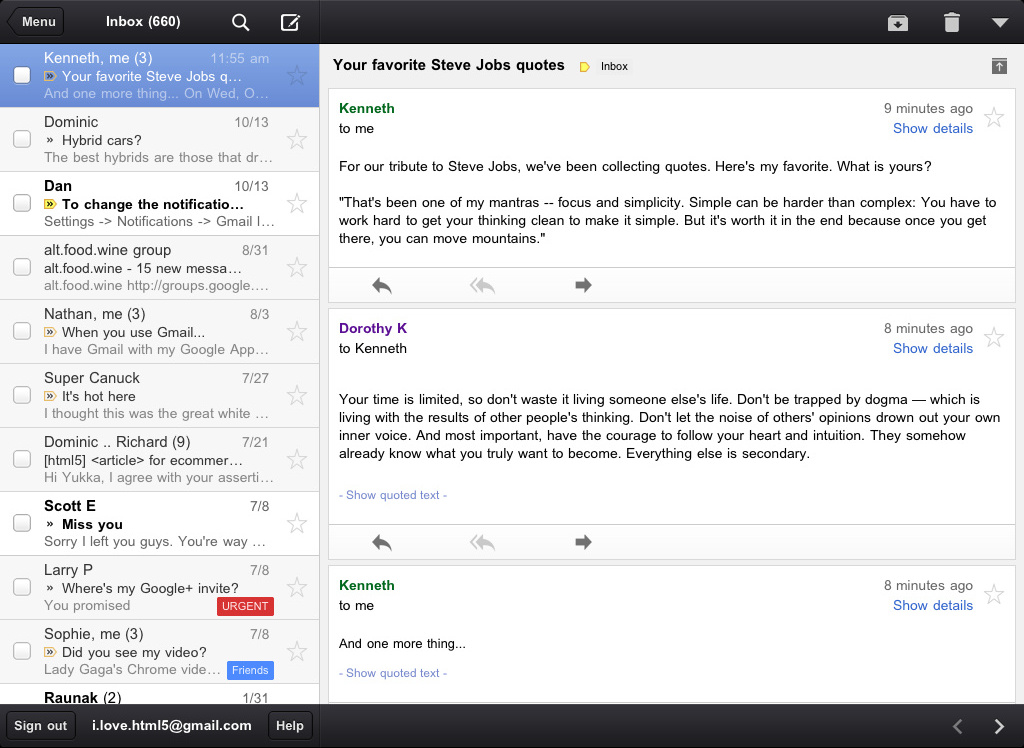
  • On iPad, navigate your inbox and read your mail simultaneously with split view


Upload photos
Reply, move, label and more


Efficiency
Our inboxes overflow with dozens and even hundreds of messages a day—and this can be even more challenging on a smaller screen. The new Gmail app helps organize your mail so you don’t have to go wading through your inbox to find that key message from your boss or loved one:

  • Focus on your important messages first with Priority Inbox
  • Quickly scan countless emails on the same subject with threaded conversations
  • Organize your mail by archiving, labelling, starring, deleting and reporting spam


Threaded conversations on the iPad


Touch
We’ve also optimized the interface so you can perform common actions in Gmail with the lightest touch:

  • Pull down your inbox to rapidly refresh if you’re eager for new mail
  • Swipe right to view your labels without ever leaving your inbox
  • Swiftly scroll through dozens of emails just by sliding your finger


Pull down to refresh
Swipe right to view labels

We hope the Gmail app makes checking email on the go a little easier. It is available in the App Store today and works on all devices running iOS 4+. For more information, check out our help center.

Update: 11/16/11 On 11/2 we launched a new Gmail app for iOS but after finding a bug removed the app from the App Store. Starting today, the Gmail app is now available again.
Read More..

Monday, March 10, 2014

New YouTube App for Windows Mobile and Nokia S60 phones

Weve been working hard to support more devices and to offer better speed, quality, and robustness in the YouTube app. So were excited to announce a new version of our mobile YouTube application thats optimized for most Window Mobile and Symbian Series 60 devices. Visit m.youtube.com from your phone to download the app.
  • More phones: Supports most Windows Mobile and Nokia S60 devices (a list of supported Nokia S60 devices is available here).
  • Speed: Faster application start-up, searching, and video loading. For even quicker access, add the application icon to your phones home screen.
  • Video quality: The application automatically detects your device and network capabilities, and selects the highest available stream quality based on those. Videos will look sharper and sound clearer than ever.
  • WiFi: Improved streaming over WiFi to support a wider range of networks.
  • More robust streaming: Improved buffering ensures that videos will play even in weak coverage areas.
  • Easy video viewing: Once installed, no configuration is required outside of the application. Weve worked really hard to make video playback "just work".
The application will alert you as more improvements become available, so keep an eye out for updates. In the meantime, visit our Community Help Forums to leave feedback for us.

For more info, check out the YouTube Blog.


Posted by Andreas Tuerk, Product Manager and Stephen Spence, Software Engineer, Mobile Team

Read More..

Tuesday, March 4, 2014

Moto G Google Play Edition Is Here! 179 and 199 Respectively

nexusae0_go_thumb


Google just dropped another new device in the Play Store. Well it’s not really new. But the Moto G is now available on Google Play as a Google Play Edition device. What’s strange is that Google is calling this a Google Play Edition, but we’re left wondering what is actually different from the normal Moto G? Since the Moto G is basically stock Android, in fact I don’t think there’s any Motorola tweaks in the Moto G like there is in the Moto X.


The Moto G Google Play Edition is on sale now for $179 for the 8GB version and $199 for the 16GB version, which is the same price as it is at other retailers, like Best Buy, and Amazon, and even Motorola’s site. This is a pretty surprising move from Google. On the Play Store Google is describing it as “a 4.5″ HD display, quad-core speed, all-day battery, interchangeable backs and the latest version of Android from Google starting at less than $200.” Remember the Moto G is featuring the Qualcomm Snapdragon 400 1.2GHz quad-core processor, with quad-band HSPA+, so it’ll support T-Mobile and AT&T’s network. But it only supports HSPA+ 21mbps network, and not T-Mobile’s 42mbps. It’s also got a 4.5-inch 720p HD display. Along with Android 4.4 – KitKat, which it already had.


Now this puts just about every OEM with a Google Play Edition device. HTC, Samsung, LG, Sony, and now Motorola. So perhaps, this is one way that Google is helping manufacturers get the latest version of Android on their devices sooner? It’s rather strange, especially putting the Moto G as Google Play Edition. We’re going to have to check out the differences here, but it looks like the only difference is the wallpaper, so far. As updates do still come from Motorola.


How many of you are thinking about rocking a Moto G for a little while? Let us know in the comments down below.


The post Moto G Google Play Edition Is Here! $179 and $199 Respectively appeared first on AndroidHeadlines.com |.


via AndroidHeadlines.com | http://www.androidheadlines.com/2014/01/moto-g-google-play-edition-179-199-respectively.html
Read More..

Acer Iconia Tab A510 Tegra 3 quad core tablet specs and review

Picture and sound quality
The Acer Iconia Tab A510 has a ten- inch (25.6 centimeter) touchscreen . with a resolution of 1280x800 pixels This glossy display presented in color vision test is a bit blurry, photos looked pale. A "poor", the Acer conceded for the low viewing angle (49 degrees horizontal, 45 degrees vertical). The sound quality when connected to a stereo got the note 3.36 (satisfactory) in the listening test were missing the highs.

Processor
Haste makes for Nvidias Tegra 3 processor. Its four cores reach benchmarks acute results (Rating: 1.99). In everyday life is the Iconia Tab A510 inputs to without delay. Toll: Needed less computing power, the four cores go into a "sleep mode", and the so-called companion or ninja-core handles - which saves battery power. In normal operation (practical application mix) held by the 15 hours and 46 minutes. Thus, the Acer Iconia Tab A510 is mobile around 80 minutes longer usable as the third iPad.

Hardware Features
From the 32-gigabyte memory are 27.41 GB for apps , files & Co. available. If necessary, you push on a microSD memory card. Via micro HDMI get photos and movies (up to 1080p) on your TV. The tablet has many photos, and text eBook formats, but it omitted some music and video formats. In addition to a five-megapixel camera, there is a second for video calling. The recordings must transfer via mini USB to the PC. The transfer rate is 12.2 megabytes per second (MB / s). In the opposite direction it was 3.94 MB / s - which is not particularly fast. Bluetooth, GPS and Wi-Fi n are missing on board, mobile telephony (UMTS).

Software Features
The operating system Android is in the current version 4.0 ( Ice Cream Sandwich ) on board. Acer installed on their tablet application SocialJogger. This connect and control your Facebook, Twitter and Flicker accounts. Acer Ring UI is a complement to traditional Android user interface. With this you navigate through various applications, or adjust settings.

Conclusion: Acer Iconia Tab A510

The Acer Iconia Tab A510 has a lot of power and impressed with multimedia and Internet functions. Particularly convinced the long battery life. For design, handling and value there are three out of five stars .
Read More..

Monday, March 3, 2014

DELL Laptops Review Vostro 3000 and Inspiron R

Dells PR agency, XPR, passed me the Inspiron 14R and Vostro 3450 for review. Both models have identical sizes and specs with some tweaks to fit the target market. How do the features differ? Heres a brief write-up.


The Dell Inspiron R is a laptop series that is fun, fast and stylish. Being consumer-focused, these laptops come with interchangeable lids to let you personalise the look. It comes pre-installed with applications like Dell Stage to give quick access to your multimedia content. Instead of remembering passwords, you can use face-recognition as a means to login.

The Dell Vostro 3000 series is targeted at business users, providing security features like fingerprint reader, and comes with technical support to ensure your business keeps going. Its aluminum finishing offers higher durability and can sustain more aggressive handling.

Between the 2, Inspiron R is better for these:
  • Better speakers with SRS Premium Sound
  • Swappable lids and colour choices
  • Supports Intel Wireless Display (not much use unless you have compatible devices)
  • Glossy LED display (1366x768) for the extra clarity when viewing photos and watching movies
  • Trackpad supports more multi-touch gestures than Vostro
  • Default 90W charger vs. Vostros 65W charger means Inspiron can charge faster.


But I prefer Vostro for these:
  • It runs visibly faster and more stable than Inspiron. I attribute that to the faster 7200rpm hard drive, or perhaps Dell souped up the Vostro. Or perhaps Inspiron has more background services that slow it down.
  • Matt LED display (1366x768) is more comfortable for lengthy use
  • Aluminum finishing at the back of the laptop and the sides. The Inspiron could suffer scratches more easily with its plastic gloss material.
  • Back-lit keyboard, excellent for low-light use
  • Slightly lighter
Brushed finishing of Inspiron R

Professional matt look of Vostro


Apart from above, both laptops have identical hardware ports placements, fan vents, keyboard layout, etc.
  • eSATA-USB-PowerShare combo port. PowerShare allows you to charge your devices even when the laptop is powered down.
  • 2x USB 3.0 Super Speed ports
  • HDMI ports, supports 1.4 for 3D output
  • Wireless 802.11a/b/g/n
  • Bluetooth 3.0
  • HD camera
  • DVD+-RW Combo Drive
  • Switchable graphics with integrated and discrete options
  • 3 Quick Launch keys to the right of the keyboard.
Id prefer the Vostro design for its practicality.
 
Prices for both these laptops start from about $900, depending on your configuration. If you are comparing laptops with other brands and models, make sure you are comparing with the same specs. Some things to look out for:
  • Processor speed (e.g. 2.3GHz) and recency ("latest 2011 2nd-gen")
  • RAM size (e.g. 4GB) and speed (e.g. 1333MHz)
  • Number of connectivity ports (USB, eSATA, HDMI, VGA, LAN, Bluetooth, WiFi, etc.)
  • Screen resolution and size
  • Battery size - the more the cells, the longer it lasts.
  • Graphics card - integrated is less powerful than discrete
  • Hard disk size (e.g. 500GB) and speed (e.g. 7200rpm)
  • Pre-installed software
  • Warranty coverage
Lastly, of course, is on the intangible factors:
  • Brand preference
  • Design preference
Read More..

The New Office 2013 and Office 365 New Features Worth Looking

The New Microsoft Office is now available. The traditional one-time license-based version is branded "Office 2013" while the new subscription-based version is called "Office 365".

Like most people, I am rather skeptical about upgrading my current Office Suite. I mean, whats there to improve on for a document processor? After going hands-on with the new Office, here are some features that might interest you to upgrade.

Integrated with SkyDrive
You can easily open your documents stored in SkyDrive. There are benefits for storing online, but one critical benefit that I want to highlight is that Skydrive stores your save history. So, you could have saved your document numerous times, but it is possible for you to retrieve an old version of a saved file, which you may choose to either restore or to download as a separate copy.

It is also possible to open your Office documents using web versions of Office, very useful when you need to work on your Office documents on a device without licensed copies of Office.

Optimised for Touch
The menu and icons are bigger and the navigation works better on touch devices. So if you find yourself frustrated with using touch on your old Office apps, this ones for you.

Apps for Office
You can install apps - similar to add-ons - to use on your Word, Excel, Outlook. On Word, there are abbreviation list app, label templates. On Excel, you can install calendar date picker, Mindmapper, graph maker. On Outlook, you can integrate your contacts with LinkedIn.

Word
You can now convert PDF documents to an editable format on Word. Previously, one would have to copy text from PDF and paste on Word and risk losing the formatting. Not anymore.

Word also has a read-friendly view, whereby documents are presented page by page. Increase the display font size and the pages will auto-reflow, much like an e-book.

Excel
Flash Fill is a new intelligence in Excel that understands your data entry pattern and auto-fills the new cell and the rest of the column. This is really a time-saver: previously you would have to conjure up formula to merge or concatenate values from other columns.

Quick Analysis is another note-worthy feature that helps you generate chart or table faster than earlier versions.

The new Excel also runs files on separate windows. Regular users would truly appreciate this convenience of working multiple Excel workbooks at once, on separate monitors.

PowerPoint
Now it is easier to use online images. Powerpoint even warns you that the online image you use might be subject to copyright.

The Presenter mode is also enhanced. You can use the on-screen pointer which will be reflected on the presentation screen, so you no longer require a laser pointer. You can also zoom-in on the slides to draw attention to your audience without leaving the presenter mode.

Outlook
One important feature that Microsoft provided is the ability to reply email within the window, whereas previous versions will open up a new window. This technically reduces RAM usage and improves performance.

Drafts are also auto-saved at an instant, so you no longer have to fret about lost drafts because you closed the draft message without saving.

There are also mouseover pop-ups that shows you real content that you can interact. For instance, when you mouseover the calendar, you will see the schedules which you can pick for editing.

Improved Online Sharing 
One final feature that is worth highlighting is the improved document sharing features. You can allow documents to be shareable, and when multiple users open the same document, the document will intelligently lock the paragraph that you are editing while allowing other sections to be editable.

You can also do online presentation on your documents by sharing a URL that Office generates so that users can view your presentation complete with screen movements.


Need It? Get It
No doubt, there are new features and improvements introduced on the Office 2013 and Office 365, most of them focused on online collaborations and cloud integration. Visit the link here to read all about the new features and if any of them interests you, then you should upgrade and improve your productivity.

Read More..

Sunday, March 2, 2014

Microsoft announces quarterly dividend increase and share repurchase program

http://techexile.com/wp-content/uploads/2013/06/Microsoft.jpg
REDMOND, Wash. — Sept. 17, 2013 — Microsoft Corp. announced on Tuesday that its board of directors declared a quarterly dividend of $0.28 per share, reflecting a 5 cent or 22 percent increase over the previous quarter’s dividend. The dividend is payable Dec. 12, 2013, to shareholders of record on Nov. 21, 2013. The ex-dividend date will be Nov. 19, 2013.

The board of directors also approved a new share repurchase program authorizing up to $40 billion in share repurchases. The new share repurchase program, which has no expiration date, replaces the previous $40 billion share repurchase program that was set to expire Sept. 30, 2013.

“These actions reflect a continued commitment to returning cash to our shareholders,” said Amy Hood, chief financial officer of Microsoft.
 Founded in 1975, Microsoft (Nasdaq “MSFT”) is the worldwide leader in software, services and solutions that help people and businesses realize their full potential.

For more information, financial analysts and investors only:
 
Investor Relations, Microsoft, (425) 706-4400
Note to editors: For more information, news and perspectives from Microsoft, please visit the Microsoft News Center at http://www.microsoft.com/news. Web links, telephone numbers and titles were correct at time of publication, but may since have changed. Shareholder and financial information is available at http://www.microsoft.com/investor.
Read More..

Saturday, March 1, 2014

Sony Xperia T2 Ultra Phablet and E1 Smartphone Announced

Sony showed the Xperia Z1 compact and Z1S and other devices at the CES 2014. This gives us a taste that Sony is not just looking at those that want a very powerful phone but also those with a low budget. 


To further strengthen that stance, Sony have announced two new devices called the Sony Xperia T2 Ultra phablet and the Sony Xperia E1 smartphone. The two newly announced devices are built with quite modest specifications and aimed at those with low budget.

Sony Xperia T2 phablet is the larger of the two devices, will be featuring a 6 inch 720p display and expected to ship with 1.4GHz Qualcomm processor. The camera will be 13MP rear camera with 16x zoom and a 1080p recording support all powered by Android Jelly Bean 4.3.
Sony Xperia T2 Ultra
The Sony Xperia T2 Ultra Phablet will have a 1GB RAM and an internal memory of 8GB with an extra SD card slot that supports up to 32GB.

According to info, the device will have LTE and Bluetooth LE support including the usual WiFi, NFC and WiFi Hotspot support.

The Sony Xperia E1 on the other hand is a smartphone with 4 inch display with a resolution of 800 x 480 which is not too impressive but again, its intended for emerging market and those with really low budget. 

The E1 will have a 1.2GHz dual-core Qualcomm processor, 3.0 mega pixel camera with 4x zoom capabilities. The RAM of the device will be 512MB and internal memory of 4GB for storage of files. Also, an extra memory card slot would be provided to increase the memory to 32GB.

Other accompany features will include 3G network support, Bluetooth 4.0, WiFi and  running Android Jelly Bean 4.3 to make it a complete smartphone.

Sony Xperia E1
As regarding release date, there is no word on that yet, however, we shall keep you posted on the release timing once weve got the information on it.

Like our Facebook page and follow us on Twitter for more relevant smartphone.
Read More..